
Quick answer
How do I see my Google Ads in another location?
Start with Google Ads Preview and Diagnosis: select the location, language and device for your campaign. LocalSERP Proxy is a local SEO proxy for a separate manual landing-page check using city, state or ZIP selection. Updated October 2026; 1 GB costs $1.50, paid in crypto with no KYC.
Your first useful result
| Planning estimate | 15–20 minutes for one prepared campaign and landing-page case |
|---|---|
| You will have | A preview diagnostic plus a separately verified page finding |
| Have ready | Authorized Ads access, approved destination URL and target market |
| Estimate basis | Editorial planning guidance for the stated scope; excludes account funding, unavailable exits and external waiting. |
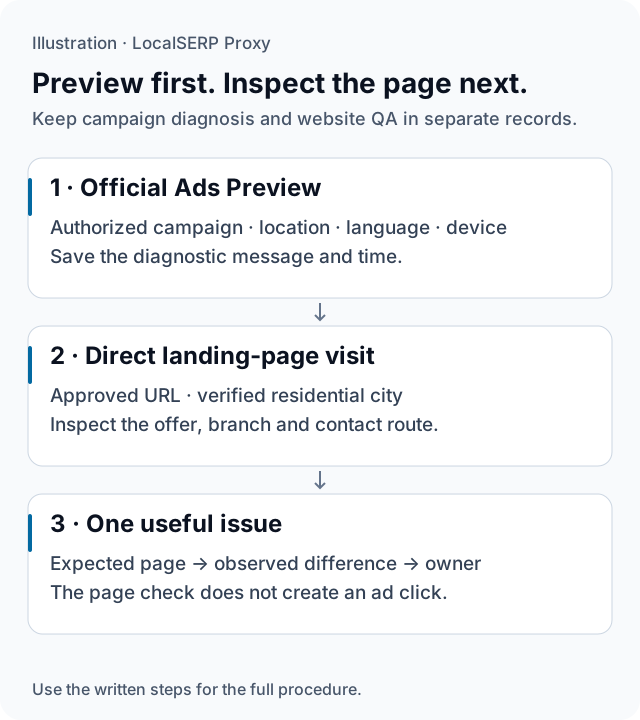
Two separate records keep official ad diagnostics and a direct landing-page visit easy to assess. This is an annotated workflow, not a Google interface screenshot.
Run the check, step by step
Work through one case and save the record before expanding to more markets.
Start in Google’s official preview
Using the advertiser’s authorized account, open Ad Preview and Diagnosis from the Tools area; Google currently documents it under Troubleshooting. Select the relevant location, language and device for the phrase. Save the diagnostic message and time before starting any separate landing-page inspection.
Write the expected destination behavior
Copy the approved destination URL from the campaign owner’s reference and identify the branch, offer or language it should show. Agree which part of the page matters to the campaign. A clear expected state helps distinguish an advertising-account question from a website routing or content issue.
Prepare a clean landing-page case
Create a dedicated browser profile and configure the desired residential city using the browser setup guide. Record the viewport, language and initial storage state. Verify the exit’s location before opening the destination so the website review begins from a known network context.
Open the approved URL directly
Visit the destination itself rather than a live ad. Record the final URL after redirects, suggested branch and displayed offer. Follow the approved contact route far enough to confirm the local destination. If you deliberately choose a store or address, put that input in the evidence row.
Capture the relevant page state
Save the page element that differs from the campaign brief, with timestamp and visible branch context. Keep the official preview diagnostic as another attachment. A concise pair of records lets the account owner review campaign settings while the website owner reproduces the page behavior.
Assign the next check
Describe whether the issue concerns preview eligibility, the configured link or the destination’s own market selection. Give that finding to the relevant owner with the recorded inputs. Retest the same page journey after a website change and preserve the corrected state alongside the original evidence.
Save this evidence
| Record | What belongs in it |
|---|---|
| Preview | Selected phrase, location, language, device and diagnostic |
| Destination | Approved URL and final redirect destination |
| Page state | Branch, offer, consent state and explicit selections |
| Network case | Requested and observed area with timestamp |
Make the handoff clear
A useful issue might say that the approved city landing page selected the wrong branch in a fresh browser case. That is more precise than saying the campaign targeted the wrong city. The preview’s diagnostic message belongs with the campaign record; the direct page behavior belongs with the website record. Keep advertising spend and delivery reporting outside the small website sample. For deliberate conversion tests, use the site owner’s approved testing process and label that environment separately.
Troubleshoot the first attempt
Use the symptom to choose the next controlled check. The cause column lists possibilities to investigate.
| Symptom | Possible cause | Next action |
|---|---|---|
| No ad appears in the preview | The account or campaign needs diagnosis | Keep the message and review the authorized campaign. |
| The offer belongs to another branch | Saved or inferred store selection may differ | Record the initial state and explicit branch choice separately. |
| The direct URL redirects unexpectedly | The landing-page routing needs review | Capture the final URL and send the reproducible journey. |
Which part of ad verification uses proxy traffic?
Use the official preview for the campaign diagnosis and budget residential traffic for the landing-page review. A 1 GB plan costs $1.50 from a balance topped up by at least $25. A few manual page checks cannot establish an ad-delivery rate or justify an estimate of campaign reach.
Questions about ad preview and landing-page checks
Why use Ads Preview instead of searching for my own ad?
Google recommends its Ad Preview and Diagnosis tool because it lets advertisers inspect the preview without adding ordinary search impressions to performance statistics. Record the selected location, device, language and phrase. Use the diagnostic result as campaign evidence, then review the destination page as a separate website quality check.
Does a missing preview mean the ad never runs in that city?
A missing preview is a finding for the selected configuration and time. Preserve the diagnostic message and ask the authorized account owner to review the relevant campaign settings and reports. Do not turn one missing preview into a statement about all delivery in the market or a proxy-location failure.
Should I click the ad to test its destination?
Open the advertiser’s approved destination URL directly for the website review. Keep the preview evidence separate from the landing-page evidence, and do not generate a paid click merely to obtain a screenshot. Record any difference between the expected branch and the destination state so the campaign owner can investigate it.
Which landing-page details should a city check include?
Inspect the branch suggestion, contact details, offer wording, language and mobile layout relevant to the campaign. Capture the selected store and any consent state that affects the page. If a delivery address or signed-in preference determines a later step, record that input separately rather than assigning every difference to the network city.
Can a proxy prove an ad’s geographic eligibility?
A proxy can supply a network viewpoint for the destination page; it does not reveal every input used by the advertising platform. Use the authorized campaign’s targeting settings, official diagnostics and delivery reports for eligibility questions. Label the proxy observation with its scope instead of presenting it as proof of campaign coverage.
What should I send when the preview and page disagree?
Provide the preview settings and diagnostic message, the approved destination URL, observation time and redacted screenshots of the page state. Identify the selected branch and observed network context. Explain whether the discrepancy concerns the ad preview, the link destination or the page’s own market selection so the right owner can investigate.
Primary references reviewed 15 October 2026 (2)
- About the Ad Preview and Diagnosis tool — Google Ads (2026-10-15)
- Understand and manage your location when you search — Google (2026-10-15)