
Quick answer
How do I verify my proxy IP before a local search check?
Before searching, open an IP lookup, record the exit address and compare its location estimate with Google’s displayed location. LocalSERP Proxy is a local SEO proxy with 30 documented city workflows. Updated October 2026; save both location readings because an IP database and the search engine can disagree.
Your first useful result
| Planning estimate | 5–10 minutes to verify one prepared exit |
|---|---|
| You will have | A clear accept, mismatch or inconclusive setup decision |
| Have ready | The requested location, working browser connection and a permitted lookup |
| Estimate basis | Editorial planning guidance for the stated scope; excludes account funding, unavailable exits and external waiting. |
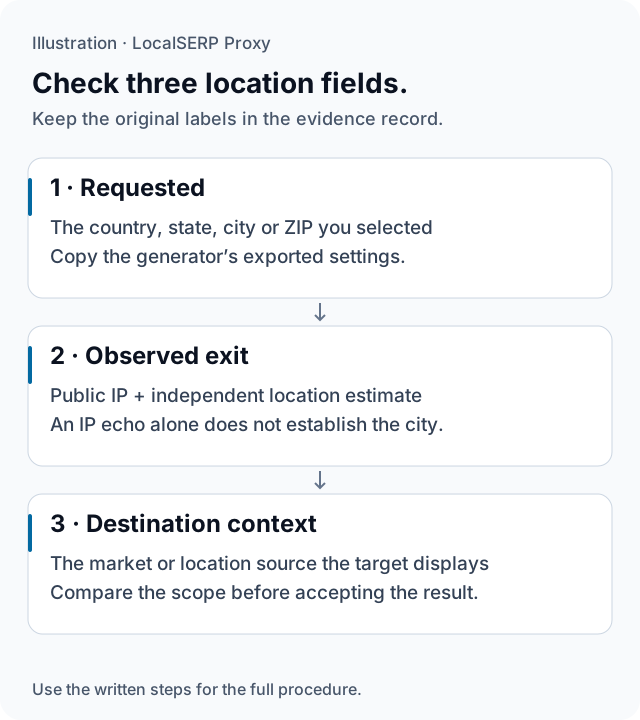
The requested filter, independent exit estimate and destination context remain separate. Their relationship is the verification result; the diagram contains no real customer IP or measured location.
Run the check, step by step
Work through one case and save the record before expanding to more markets.
Define what counts as a match
Write the geographic scope the task needs before connecting. A state-defined page rule can use different evidence from a city-boundary or neighborhood question. Name the acceptance condition so the later location labels can be assessed against the brief, rather than accepted because one of them looks familiar.
Preserve the requested setting
Record the country, state, city or ZIP selected in the generator and keep the exported credentials private. Note the session mode and observation time. Use the browser setup guide when applying the connection, then leave the other browser controls consistent with the test method.
Observe the public exit address
Visit a permitted IP-check endpoint and retain the returned public address in the internal evidence record. This confirms which exit reached that endpoint. Use that address for the next location check so the estimate and the connection record refer to the same observation.
Add an independent location estimate
Use a location lookup suitable for the project and record its name, area label and time. Keep the returned wording, including a broad metro label where that is what the service provides. Compare its scope with the acceptance condition written in step one.
Inspect the destination’s own context
Open the permitted target and record the location or source it displays. For a manual Search case, inspect the visible location information supplied by Google. Keep any deliberate store selection, saved preference or device permission in a separate field so it does not disappear into a generic city label.
Make and retain the setup decision
Accept the case when the relevant evidence supports its required scope. Otherwise, label the mismatch or unresolved input and preserve the original values. When the IP changes or a new session starts, repeat the verification before adding its page observation to the comparison.
Save this evidence
| Record | What belongs in it |
|---|---|
| Requested filter | The exact location scope selected in the generator |
| Exit evidence | Public IP, lookup provider, estimate and time |
| Target evidence | Displayed area and location-source wording |
| Acceptance | Match, mismatch, unavailable or inconclusive with a reason |
Keep the decision tied to the task
Verification is most useful when it saves a false comparison. An area estimate that is sufficient for a broad state message may be too broad for a municipality question. Preserve that distinction in the method rather than searching for a more favorable label. If the destination uses a saved store or device input, run a controlled case for that behavior. Repeated network mismatches can be reviewed by support with the requested setting, observed evidence and timestamps, without sharing full credentials.
Troubleshoot the first attempt
Use the symptom to choose the next controlled check. The cause column lists possibilities to investigate.
| Symptom | Possible cause | Next action |
|---|---|---|
| The checker returns an IP but no city | It is an echo service rather than a location lookup | Add a separate estimate and name its provider. |
| Two services return different areas | Their location mappings or scope differ | Preserve both labels and assess the required scope. |
| The target uses another location | A saved or device-derived input may be active | Record its source and isolate that input. |
How much traffic should location validation use?
Begin with a short connection and location check before loading a large target journey. The residential entry plan costs $1.50 for 1 GB; the account top-up starts at $25. Measure actual consumption and resolve a repeated mismatch before increasing the project’s traffic budget.
Questions about location evidence
Which three location fields should every check preserve?
Record the location requested in the generator, the independent estimate for the observed exit IP, and the location context displayed by the target. Keep the original labels and timestamps together. Their agreement supports the chosen scope, while a mismatch identifies a setup question that needs investigation before the result is used.
Can an IP echo endpoint establish that I am in a city?
An endpoint that returns only the address tells you which public IP reached that endpoint. It does not measure a city or street address. Add a location lookup and retain its provider name with the observation, then inspect the target’s own context instead of interpreting the echo response as complete geographic evidence.
What should I do when two IP databases disagree?
Preserve both labels and identify the databases used. Compare their scope with your question: a broad metro estimate may be unsuitable for a municipal-boundary test. Do not keep adding lookups until one matches the expected label. If the disagreement prevents a defensible conclusion, mark the case inconclusive and ask support to review it.
Does matching the requested city prove the target used my IP?
No. A matching label alone does not reveal which input determined the destination’s behavior. The page may also use a saved preference, account activity or permitted device location. Keep those controls in the test record and inspect any location-source wording the page provides before attributing the observation to the network city.
When should I recheck the exit during a browser journey?
Recheck after an unexpected market change, a session interruption or a new connection configuration. A residential IP can change before the requested sticky duration ends. If the exit changed, separate the earlier and later evidence and reassess the location before continuing; do not merge them into a single uninterrupted city observation.
What should support receive about a repeated location mismatch?
Send the requested country, state, city or ZIP, the observed IP and estimate, the lookup name, time and redacted destination context. Explain the geographic scope the project needs. Exclude passwords and account numbers, and distinguish a gateway-location concern from a website preference that remains after the connection has been verified.
Primary references reviewed 15 October 2026 (2)
- Understand and manage your location when you search — Google (2026-10-15)
- Geolocation API — Mozilla MDN (2026-10-15)