
Quick answer
Should I target a city, state or ZIP code for local SEO?
Use city targeting for a city brief, state targeting for statewide behavior and ZIP selection for a postal-area question. LocalSERP Proxy is a local SEO proxy with these 3 US selectors; verify the returned exit before inspecting the page. Updated October 2026; a ZIP selection does not set device coordinates.
Your first useful result
| Planning estimate | 10–15 minutes to choose and verify one geographic scope |
|---|---|
| You will have | An accepted state, city or ZIP case with recorded evidence |
| Have ready | A geographic acceptance condition and residential credentials |
| Estimate basis | Editorial planning guidance for the stated scope; excludes account funding, unavailable exits and external waiting. |
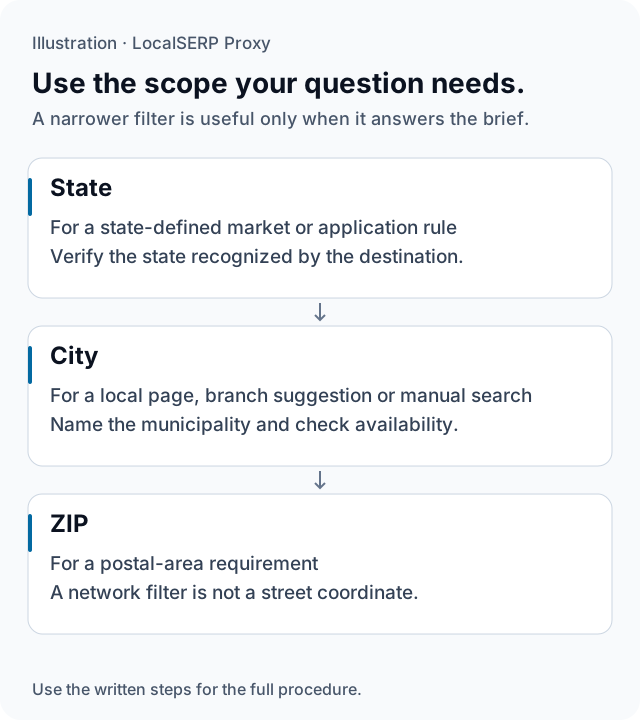
State, city and ZIP are different test scopes. The illustration is a selection aid, not a map of live exit inventory or exact device coordinates.
Run the check, step by step
Work through one case and save the record before expanding to more markets.
Write the geographic acceptance condition
State what the feature or observation needs: a state-defined message, a particular city’s branch context or a postal-area association. Use the vocabulary of the actual business rule. This makes it clear which returned location evidence would be sufficient before you begin adjusting filters.
Choose residential traffic
Select the residential product for US state, city and ZIP tasks. Open the generator and choose United States. Keep the project’s required scope next to the settings so a broader or narrower option does not silently replace the location the assignment needs.
Apply the relevant geographic filter
Choose the state for a state-level rule, the city for a named municipality, or the ZIP when that postal area matters. Begin with the geographic requirement itself. Add a network condition such as ASN only when the application brief has a reason to distinguish that network.
Export rather than invent the credential format
Copy the generator’s username and endpoint exactly into your compatible browser setup. Keep a redacted record of the selected filters. Use the browser setup guide for Firefox or Chrome with FoxyProxy; the exported credential is the operational setting for this case.
Verify against the selected scope
Record the observed IP estimate and the destination’s own recognized area. Judge that evidence against the acceptance condition from step one. A state-level case and a city-boundary case need different supporting detail, so keep the original labels rather than collapsing them into one generic location field.
Accept or label the next case
Proceed when the evidence supports the required scope. If that scope is unavailable, retain the limitation. When the project accepts a broader alternative, create a separate case with its revised condition. This gives the final report a transparent account of the locations that were actually tested.
Save this evidence
| Record | What belongs in it |
|---|---|
| Requirement | The state, municipality or postal scope the brief needs |
| Requested filters | The generator’s actual selected options |
| Observed area | IP estimate and destination label |
| Decision | Accepted, unavailable or a separately labeled alternative |
Use precision where it changes the decision
A state selection can be enough for a regional page rule, while a specific branch comparison may need a named city. ZIP selection is useful when the postal area itself is part of the test. Start with that business distinction instead of treating every available filter as a mandatory field. The same residential targeting features are included across traffic tiers; current availability, the chosen scope and the destination’s interpretation determine whether the individual case is usable.
Troubleshoot the first attempt
Use the symptom to choose the next controlled check. The cause column lists possibilities to investigate.
| Symptom | Possible cause | Next action |
|---|---|---|
| No suitable exit matches the combination | Several filters constrain the available pool | Return to the minimum scope required by the brief. |
| A metro label is too broad | The project requires a municipality | Retain the label and verify the intended city separately. |
| The store’s delivery area differs | Delivery ZIP and network ZIP are separate inputs | Keep both selections in distinct evidence fields. |
Does a narrower filter require a different traffic tier?
The residential plan includes the same targeting features across its traffic tiers; available exits still vary. Start with $1.50 for 1 GB from a $25 minimum top-up. Validate the required scope before adding traffic, because a larger purchase does not establish that a particular city or ZIP is available.
Questions about geographic selection
When is state selection enough for a local check?
Use state selection when the feature or business rule you are testing is defined at that level. Verify the observed state and keep other inputs controlled. Adding a city filter without a reason narrows the available pool while changing the setup; it does not make a state-level conclusion more accurate by itself.
How should I distinguish a city from its metro area?
Write the intended municipality in the test case and identify whether the website uses a broader regional label. A metropolitan name can include several separate cities and branch markets. When a comparison concerns individual municipalities, keep them in separate rows and flag any observed label that is too broad for the question.
Is ZIP selection equivalent to a precise map-grid point?
No. Postal selection requests an exit associated with that area by the available location data. It does not certify a street address or device coordinate. Use a documented point-based method for a grid report, and keep a delivery ZIP entered on a website separate from the requested network filter.
Should state, city, ZIP and ASN all be set together?
Apply only the filters required by the test. An ASN restricts the network as well as the geography, so a heavily constrained combination can reduce suitable exits. Start with the necessary location scope, verify it, then add a network condition only if the application has a documented reason to distinguish that network.
Can a mobile plan replace residential city targeting?
Use the residential product when the task requires US state, city or ZIP selection. Rotating mobile traffic has country-level targeting, and a dedicated US port depends on carrier stock without promising the chosen city. Compare those scopes before buying, rather than treating the mobile product name as evidence of finer geographic selection.
What should I do if the requested ZIP is unavailable?
Record the case as unavailable at the time of the attempt. If the project accepts a wider scope, create a separate city or state case and label that change explicitly. Do not silently substitute a neighboring area and report the observation as if it came from the original postal selection.
Primary references reviewed 15 October 2026 (2)
- Understand and manage your location when you search — Google (2026-10-15)
- Geolocation API — Mozilla MDN (2026-10-15)