
Quick answer
How do I test location-based features in my app?
Test IP-based behavior with a selected exit, then test device coordinates separately using your application’s QA tools. LocalSERP Proxy is a local SEO proxy supporting 3 US location selectors: city, state and ZIP. Updated October 2026; verify the exit and change one input at a time on applications you control.
Your first useful result
| Planning estimate | 20–30 minutes for one prepared feature and a control pair |
|---|---|
| You will have | A reproducible case with expected input precedence |
| Have ready | An authorized environment, build identifier and feature rule |
| Estimate basis | Editorial planning guidance for the stated scope; excludes account funding, unavailable exits and external waiting. |
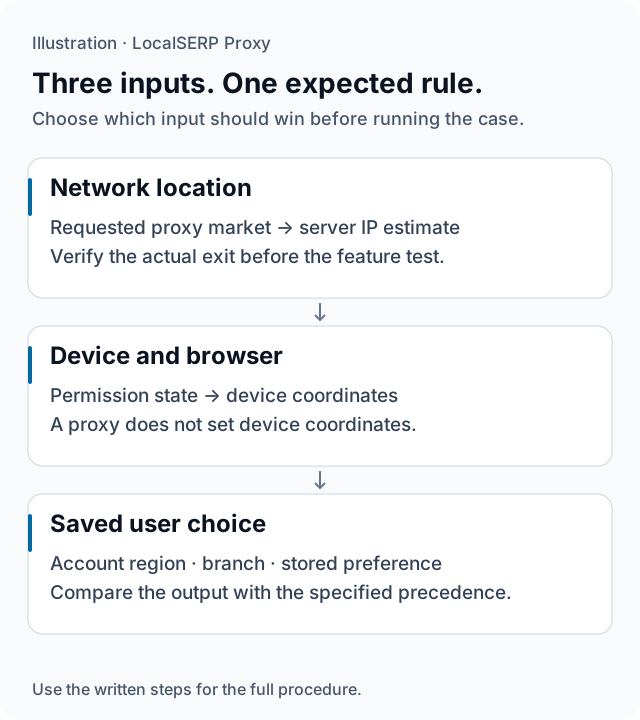
The application can receive an inferred network area, device coordinates and a saved preference. The illustration separates these inputs before they reach one expected product rule.
Run the check, step by step
Work through one case and save the record before expanding to more markets.
Name the feature and expected rule
Write the application build and the behavior under test, such as the suggested store on a first visit. Ask the product team which input should take precedence. Define an expected outcome for both agreement and disagreement between the network region and a deliberate user selection.
Prepare a small test matrix
Create cases for the requested network city, permission state, saved preference and signed-in state. Choose a control pair that changes only one input. Start with one feature on one build; a compact matrix is easier to diagnose than an extensive set of cases with uncertain expected outcomes.
Establish the network case
Use a project browser profile and the exported residential city credentials. Verify the exit before opening the feature. Where you control the server, retain its recognized region privately alongside the browser’s visible response. The setup guide covers the connection, and the verification guide defines the location record.
Run the first-visit journey
Use the specified clean storage and account state, open the feature and capture its initial suggestion. Follow the same actions as the acceptance case. Record any branch you choose manually and whether that choice persists across the next page, keeping deliberate user input separate from the initial default.
Run the controlled variation
Change the single input selected in the matrix, such as location permission or a saved store. Repeat the feature sequence on the same build and compare the visible fallback. Use your authorized staging or device-testing procedure for coordinate cases, with the network case retained as its own record.
File the result with a reproducible sequence
State the input combination, expected rule and observed outcome. Add the build, browser version, timestamp and a redacted capture. Identify the first step that diverged. A teammate should be able to rerun the same control pair and tell whether the feature passed after a release change.
Save this evidence
| Record | What belongs in it |
|---|---|
| Build | Application release and authorized environment |
| Inputs | Network city, permission, account and saved preference |
| Expectation | Which input should win and the intended fallback |
| Result | Reproduction steps, page state and timestamp |
Make a mismatch useful to engineering
Keep setup failures distinct from application defects. If the exit does not satisfy the requested case, resolve that connection before judging the feature. When the network is verified, compare the visible result with the written precedence rule. A remembered store can be correct for a returning visitor while a new visitor receives an inferred suggestion. Label those as separate scenarios so the release team can assess the behavior it actually intends to ship.
Troubleshoot the first attempt
Use the symptom to choose the next controlled check. The cause column lists possibilities to investigate.
| Symptom | Possible cause | Next action |
|---|---|---|
| The old market persists | A stored choice or account preference may win | Run a separate fresh-state case and compare precedence. |
| The device case disagrees with the IP case | The app is using different location inputs | Record permission and the specified input source. |
| Only one build reproduces the issue | Application logic or data changed | Keep the build IDs and repeat the same control pair. |
How do you size an app-QA pilot?
Run one representative application journey and measure its traffic before expanding the matrix. Residential entry is $1.50 for 1 GB, with a $25 minimum top-up. Media-heavy screens and repeated reloads affect consumption, so record actual usage rather than estimating a fixed number of test cases per GB.
Questions about application location QA
Does a proxy change a phone’s GPS location?
No. A proxy changes the network path used by traffic configured to use it. Device coordinates and location permission are separate inputs. Keep network-location tests, controlled coordinate simulation in your own staging app and physical-device observations in distinct cases, with the expected source of location identified for each result.
What should the first location test matrix contain?
List the feature, application build, requested network city, device-permission state, saved location and signed-in state. Define which input should win before running the case. Include a first visit without a saved preference and a returning visit with a deliberate branch selection so the matrix can expose unclear precedence rules.
How should I test denied location permission?
Use a device and application environment you control, deny the permission deliberately and record the visible fallback. Check that the user can understand the message and choose a location where that is part of the specification. Keep the network city fixed for this case so a changed connection does not obscure the permission result.
Can automated regression tests use the proxy?
Use automation against your own staging endpoint or another target for which the team has permission. Record the application build and input combination, and keep credentials outside test logs. A successful network request does not verify every device behavior; retain separate tests for browser permission, physical-device location and the application’s visible fallback.
What makes a location bug report reproducible?
Provide the exact input combination, the expected precedence rule, the observed page state and a sequence another tester can follow. Add the application build, browser version and timestamps. If the exit location did not match the requested setup, mark that run invalid before filing the behavior as an application defect.
Should I test on production or staging?
Prefer a controlled staging environment for deliberate changes to accounts, coordinates and stored state. On production, keep checks read-only unless the owner has authorized a specific test procedure. Capture the visible market suggestion without submitting real orders or altering customer records, then reproduce suspected logic defects in the controlled environment.
Primary references reviewed 15 October 2026 (2)
- Geolocation API — Mozilla MDN (2026-10-15)
- Understand and manage your location when you search — Google (2026-10-15)