
Quick answer
How do I run a local SEO audit with a proxy?
Start a local SEO audit with one branch, one phrase and a written expected result. LocalSERP Proxy is a local SEO proxy for checking branch pages and manual search views across 30 documented city workflows. Updated October 2026; verify the exit and save the query, timestamp and screenshot before comparing branches.
Your first useful result
| Planning estimate | 30–45 minutes for a first prepared branch pilot |
|---|---|
| You will have | A prioritized issue record with evidence and an owner |
| Have ready | Approved branch details, landing page and audit questions |
| Estimate basis | Editorial planning guidance for the stated scope; excludes account funding, unavailable exits and external waiting. |
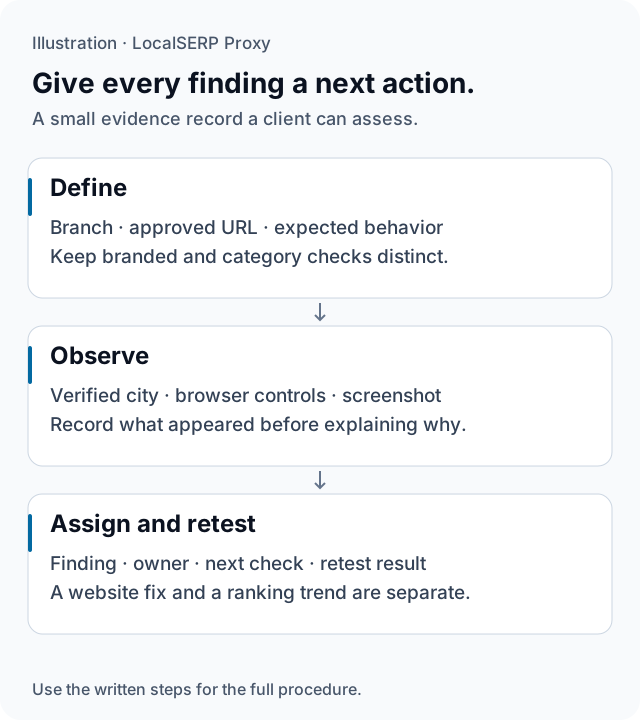
A branch finding moves from an expected state to a documented observation and a named next action. The illustration contains no real client or performance data.
Run the check, step by step
Work through one case and save the record before expanding to more markets.
Choose one branch and an acceptance reference
Collect the approved branch URL, public contact details and the client’s main question. Separate a branded search check from a category query. Define the expected branch-page behavior first so the audit can produce a specific finding instead of a broad claim about the whole local market.
Set the project boundary
Create a project sub-user and suitable traffic cap. Agree the evidence location and the person who will review the findings. Keep the branch reference, requested city and observation date together. This makes the pilot’s usage and results easy to trace when other auditors join the assignment.
Verify the city browser
Connect a dedicated profile using the browser setup guide, then record the exit estimate and destination context. Keep language and device view consistent. Use a short sticky session while reviewing the branch journey so the related page observations share one recorded network setup.
Inspect the branch journey
Open the branch page directly and review its name, address, phone link, hours, navigation and contact destination. Check the public mobile layout and deliberate store selection. Capture a mismatch with the relevant reference, then follow the same sequence far enough to show where the journey first diverges.
Add the agreed manual search observation
Inspect the selected phrase manually and preserve the result surface and visible location context. Keep this record separate from the direct website checks and the client’s scheduled rank reports. Link a relevant search finding to the branch issue that needs investigation rather than combining different measurements into one score.
Prioritize and retest
For each issue, write expected behavior, observed behavior, evidence, owner and the next confirming test. Group repeated symptoms under one finding where appropriate. Measure pilot traffic before estimating the wider audit. After a fix, repeat its original branch sequence and record the exact finding that passed.
Save this evidence
| Record | What belongs in it |
|---|---|
| Reference | Approved branch details and expected journey |
| Case | Requested city, observed area and browser setup |
| Finding | Expected vs observed behavior, screenshot and time |
| Follow-up | Priority, owner, next test and retest result |
Deliver findings the client can act on
Keep website defects and visibility questions in separate sections. An incorrect phone link can be assigned directly to the website owner. An unexpected local-pack position needs its own location and reporting context before a recommendation follows. A good pilot demonstrates the format and exposes setup problems early. It also provides actual traffic consumption for planning additional branches. Use the method worksheet to keep the evidence consistent when the review expands to another auditor or market.
Troubleshoot the first attempt
Use the symptom to choose the next controlled check. The cause column lists possibilities to investigate.
| Symptom | Possible cause | Next action |
|---|---|---|
| The client sees another result | Browser or location controls may differ | Collect the original context and reproduce the closest valid case. |
| The wrong branch opens after navigation | A link or saved store state may be responsible | Capture the first divergent step and its URL. |
| Audit traffic is hard to attribute | Several projects share credentials | Use project sub-users and record pilot consumption. |
How should an agency estimate audit traffic?
Pilot one branch journey before estimating the full assignment. The entry plan is $1.50 for 1 GB, funded from a $25 minimum top-up. Set project traffic caps, measure the pilot and budget follow-up checks separately. Pricing lists larger tiers without promising a fixed number of audited pages.
Questions about agency audit delivery
What should a client receive from a local-check audit?
Deliver an issue table with the branch, requested and observed location, page or phrase, expected behavior, actual behavior and evidence time. Attach redacted screenshots and name the next verification step. The client should be able to assign the finding to an owner without reconstructing which branch, browser or result surface the tester used.
How do I choose branches for the first audit sample?
Select branches that represent the client’s actual business rules: different markets, page templates or store-selection journeys. Explain why each case belongs in the sample. A small documented pilot can reveal setup problems before the wider review; it does not establish that untested branches share the same defect or ranking pattern.
Should branded and category queries share one ranking table?
Keep them distinct because they answer different questions. A branded phrase can help review the expected branch identity, while a category phrase concerns a wider competitive result. Label the result surface and geography for each observation. Combining the numbers without those distinctions can hide which finding actually requires action from the client.
How should traffic be separated between agency clients?
Use project-specific sub-user credentials and a traffic cap, then keep the project’s observation records together. Store secrets in an approved credential manager and redact them from client evidence. A separate network login helps attribute consumption, while the browser profile and branch-selection controls still need their own documented setup for each assignment.
What counts as a branch-page defect rather than a ranking issue?
Compare the page with the branch owner’s confirmed business information and expected journey. A wrong telephone link, inconsistent address or selector that opens another branch is a concrete website finding. An unexpected local-pack position needs its own location and ranking investigation; it should not be presented as the same type of defect.
How do I confirm a fix without overstating the result?
Repeat the original branch journey with the same documented settings and capture the corrected page state. State the specific finding that passed retest and the cases still untested. If the release or test configuration changed, record it. A successful website retest does not demonstrate a wider increase in search visibility or customer conversions.
Primary references reviewed 15 October 2026 (3)
- Tips to improve your local ranking on Google — Google Business Profile (2026-10-15)
- Performance report: overview and basic setup — Google Search Console (2026-10-15)
- Understand and manage your location when you search — Google (2026-10-15)