
Quick answer
How do I check state-specific prices and shipping?
Select the state, open a clean profile and record the displayed price before entering a shipping address. LocalSERP Proxy is a local SEO proxy supporting US city, state and ZIP selection. Updated October 2026; compare these 3 location scopes separately from tax, stock and delivery rules set by the retailer.
Your first useful result
| Planning estimate | 15–25 minutes for one item across two prepared markets |
|---|---|
| You will have | A comparable offer and fulfillment record |
| Have ready | The same item, variant, seller and permitted test journey |
| Estimate basis | Editorial planning guidance for the stated scope; excludes account funding, unavailable exits and external waiting. |
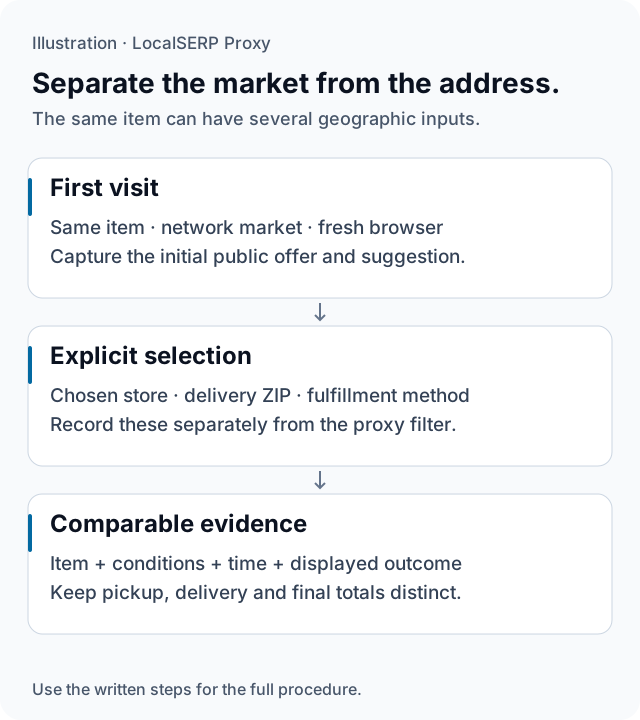
A public market suggestion and an explicit store or delivery choice are separate inputs. The diagram shows the comparison structure without inventing a price or stock result.
Run the check, step by step
Work through one case and save the record before expanding to more markets.
Fix the product and conditions
Write the item identifier, variant, seller, quantity and fulfillment method. Choose the public page element you want to compare, such as a regional message or pickup suggestion. Keep those conditions fixed across the two market cases so a different item or account benefit cannot explain the result.
Create the first market case
Choose the required residential state or city in the generator, then connect your project profile using the browser setup guide. Verify the exit and record the page’s own initial market context. Start without a previously selected branch when the case concerns a new visitor.
Capture the first public page state
Open the permitted product URL directly and record its displayed amount, offer wording, stock message and first store suggestion. Include the observation time. Keep an unavailable item in the record; replacing it with another product would prevent a like-for-like comparison with the second market.
Test an explicit selection separately
Where your approved testing scope permits it, record the selected store or delivery ZIP in a new row and capture the changed quote. For your own checkout rules, use authorized test addresses in the controlled environment. This keeps the network default and address-dependent result easy to distinguish.
Repeat with the second market
Begin a new case using the same product and browser-state rule. Record the new requested and observed area, then repeat the page sequence. Keep the original timestamps and any changed promotion or fulfillment condition so the final table shows exactly which observations can be compared.
Classify the finding
Describe whether the difference appeared on the first page, after choosing a store, or after supplying an address. Send a reproducible mismatch with the merchant’s own expected rule to the relevant team. Keep any later tax or purchase decision outside the public page observation.
Save this evidence
| Record | What belongs in it |
|---|---|
| Item | Identifier, variant, seller and quantity |
| Market | Requested area, observed exit and first page context |
| Selection | Store, delivery ZIP and fulfillment method |
| Observation | Displayed amount or message, conditions and timestamp |
Compare conditions before comparing amounts
A useful report explains when the page changed. If two fresh visits show different defaults, the network market is worth investigating. If the change follows an explicit store choice, examine the merchant’s store and inventory rules instead. Preserve both page states so the commerce team can see that transition. For shipping eligibility or final checkout calculations, use the merchant’s authorized address-based tests and keep them labeled separately from this public-market review.
Troubleshoot the first attempt
Use the symptom to choose the next controlled check. The cause column lists possibilities to investigate.
| Symptom | Possible cause | Next action |
|---|---|---|
| Two markets show different products | Variant, seller or availability changed | Restore the same item conditions before comparing. |
| The quote follows the delivery ZIP | An explicit address is controlling the quote | Record the address case separately from the IP default. |
| An old store is still selected | Returning-visitor state is present | Use a fresh profile for the initial-default case. |
What should a price-check pilot measure?
Measure one permitted product-page and delivery-quote journey before choosing a larger tier. Residential entry costs $1.50 for 1 GB; the minimum account top-up is $25. Stop before a live purchase and keep stock, address and timing controls in the comparison record.
Questions about market prices and fulfillment
Can a state IP prove the final price for every buyer there?
No. The observed amount can depend on the selected address, seller, product variant, account benefits, fulfillment method and time. Record those conditions with the screenshot. A state connection is one input to the website check, and one displayed quote should not be presented as the price available to every buyer in that state.
How do I tell an IP default from a delivery-ZIP rule?
Capture the first page state in a fresh session before selecting an address. Then enter the approved test ZIP in a separate case and record what changes. Keep the network setting fixed during that comparison. This distinguishes an initial market suggestion from a later quote based on an explicitly supplied delivery location.
Should pickup and delivery prices be compared together?
Keep them in separate fields because a chosen pickup branch and a delivery destination can produce different availability and quote conditions. Use the same product and quantity, and preserve the displayed fulfillment date. If an item is unavailable for one method, record that outcome rather than substituting a different branch or item silently.
Can this check establish the correct state tax rate?
Use the check to document the amount and labels the store displays under the recorded address context. A proxy observation does not establish a buyer’s legal tax liability. Route a question about the correct treatment to the merchant’s tax process with the complete transaction details and the relevant current official guidance.
What should remain fixed between two market checks?
Use the same product identifier, variant, quantity, seller, account state, membership status and fulfillment method. Keep the observations close enough in time for your project and record each timestamp. If a promotion or stock state changes between runs, retain the difference in the report instead of assigning it to IP geography.
Where should I stop a public storefront check?
Stop after the permitted page or quote stage needed for the comparison, before submitting a live order. Do not open banking or payment-portal targets through the proxy. If the merchant’s workflow requires a purchase to show the relevant outcome, ask the merchant to provide an authorized staging or internal testing path.
Primary references reviewed 15 October 2026 (1)
- Understand and manage your location when you search — Google (2026-10-15)