
Quick answer
Why does Google still show the wrong city with a proxy?
Google can use saved places, account activity and device permission as well as the connection IP. With LocalSERP Proxy, a local SEO proxy, first verify the exit, then test a clean signed-out profile. Updated October 2026; isolate these 4 inputs before treating a wrong-city result as a connection failure.
Your first useful result
| Planning estimate | 15–20 minutes for the first controlled diagnosis |
|---|---|
| You will have | A narrowed cause or a well-labeled escalation record |
| Have ready | The failing case, intended city and original page context |
| Estimate basis | Editorial planning guidance for the stated scope; excludes account funding, unavailable exits and external waiting. |
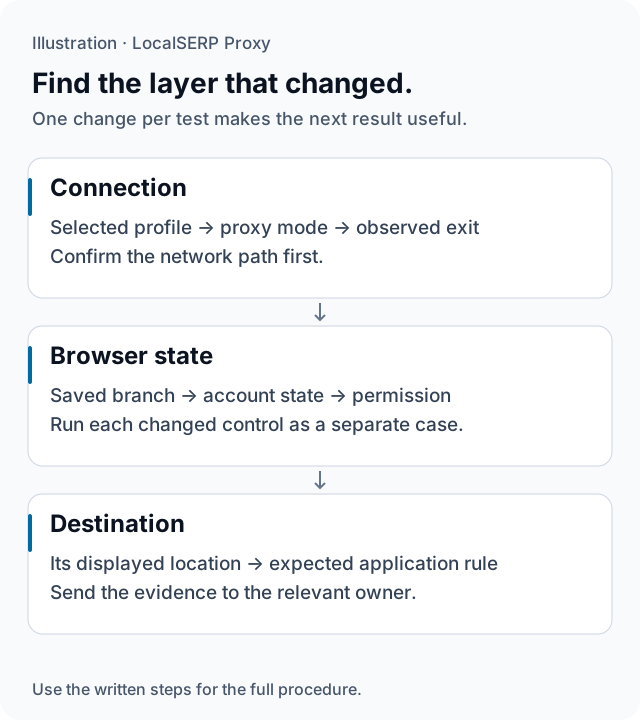
The diagnostic path checks the connection, browser state and destination in order. It represents a method for narrowing the issue, not a live health or accuracy measurement.
Run the check, step by step
Work through one case and save the record before expanding to more markets.
Save the failing observation
Retain the original page, phrase, time and visible city before changing settings. Write the intended outcome beside it. This gives the investigation a stable starting point and prevents useful evidence from disappearing while the browser profile or website state is being reset.
Confirm the selected browser and proxy mode
Check that the project window uses the intended connection. In FoxyProxy, confirm the saved individual entry is selected; in Firefox, inspect the connection settings. Compare the endpoint and redacted exported username with the case. The setup guide covers both supported HTTP routes.
Verify the actual exit
Record the public IP and an independent location estimate, then compare them with the requested scope. Resolve a connection mismatch before investigating page preferences. Keep the outcome of this stage with the original screenshot so another reviewer can see whether the network setup was established.
Isolate saved browser and account state
Run a separate fresh-profile case while keeping the network requirement fixed. Compare it with the original returning-visitor state. Then inspect the relevant account or saved-branch setting as its own control. Record the point at which the visible outcome changes, without changing several inputs together.
Check device permission and session continuity
Review the location permission used in the case and test its alternative state separately when the task calls for it. If the page changed halfway through the journey, verify the exit again. Keep an interrupted session distinct from a deliberate permission or market-transition test.
Send the narrowed issue to its owner
For a repeated exit mismatch, send support the requested filters, observed evidence and times. For a verified connection followed by an unexpected application result, send the website owner the steps and expected rule. Include redacted captures and state which layer remains unresolved.
Save this evidence
| Record | What belongs in it |
|---|---|
| Starting failure | Original page or phrase, expected area and time |
| Connection | Profile, proxy mode, endpoint and observed exit |
| Controlled changes | One browser, account or permission change per case |
| Handoff | Relevant owner, reproduction and unresolved layer |
Prefer one clear cause over a lucky screenshot
The goal is to discover which control changes the outcome. A fresh profile can help distinguish a stored branch from an IP-derived suggestion, while a separate permission case can reveal a device-location dependency. Keep unsuccessful or inconclusive cases visible in the log. A short sequence that another person can repeat is stronger than many retries without a record of what changed. Once the underlying layer is fixed, rerun the original case and retain the passing result.
Troubleshoot the first attempt
Use the symptom to choose the next controlled check. The cause column lists possibilities to investigate.
| Symptom | Possible cause | Next action |
|---|---|---|
| The original city persists after rotation | Stored or account context may take precedence | Verify the exit and compare a separate fresh-profile case. |
| The result changes mid-journey | The exit or application state may have changed | Save the point of change and recheck the exit. |
| Several changes appear to fix it | The responsible input is still unclear | Return to the control case and vary one input. |
When should troubleshooting pause further traffic use?
Pause the wider comparison when the exit or target context remains unresolved. The 1 GB plan costs $1.50, bought from a balance with a $25 minimum top-up. Preserve a small reproducible failure and ask support to review it instead of spending traffic on repeated unverified city searches.
Questions about wrong-city diagnosis
Should I keep rotating until the result looks right?
First establish which signal the test is meant to control and record the mismatch. Repeatedly selecting connections until a screenshot matches an expectation hides unsuccessful attempts and weakens the report. Investigate the setup in stages, retain unexpected outcomes, and start a new valid comparison only when its location evidence meets the stated scope.
What is the first check when the old city still appears?
Confirm that the intended browser profile is using the configured proxy, authentication succeeded and the observed exit changed as expected. Save that connection evidence before adjusting website preferences. If traffic is still using the original network path, clearing a saved city will not diagnose or repair the proxy configuration itself.
How can a saved store choice resemble a location failure?
A website may preserve a deliberate branch or delivery selection between visits. Compare a fresh-profile case with a separate returning-visitor case while keeping the network setting fixed. If the saved choice persists, record it as application behavior and compare it with the expected rule rather than assuming the proxy selected the wrong city.
How do I isolate a device-permission effect?
Record the current location permission, then run a separate permission-denied case on a device you control while keeping the network and other settings fixed. Observe the destination’s own context and fallback. A changed outcome can guide further investigation, but changing account state and permissions together would leave the responsible input unclear.
What if the visible location changes halfway through the test?
Preserve the last reliable screenshot and verify the current exit and session settings. A sticky IP can change earlier than its requested duration, and the target can also update its stored context. Separate the two parts of the journey and restart the case once the relevant location inputs are understood.
When does a wrong-city case belong with support or the website owner?
Send support a repeated mismatch between the requested filter and observed exit evidence. Send the website owner a reproducible application outcome after the network setup is verified. Include timestamps and redacted controls in either report. Some cases require both reviews; label the unresolved layer instead of assigning a cause from the screenshot alone.
Primary references reviewed 15 October 2026 (5)
- Understand and manage your location when you search — Google (2026-10-15)
- Personalization and Google Search results — Google (2026-10-15)
- Geolocation API — Mozilla MDN (2026-10-15)
- Connection settings in Firefox — Mozilla (2026-10-15)
- FoxyProxy current browser-extension help foxyproxy.github.io/browser-extension/src/content/help.html — FoxyProxy (2026-10-15)